
Photography Bookkeeping Spreadsheet for Excel and Google Sheets
Running a photography business means managing sessions, client payments, equipment costs, software subscriptions, marketing expenses, sales tax, and profit throughout the year.
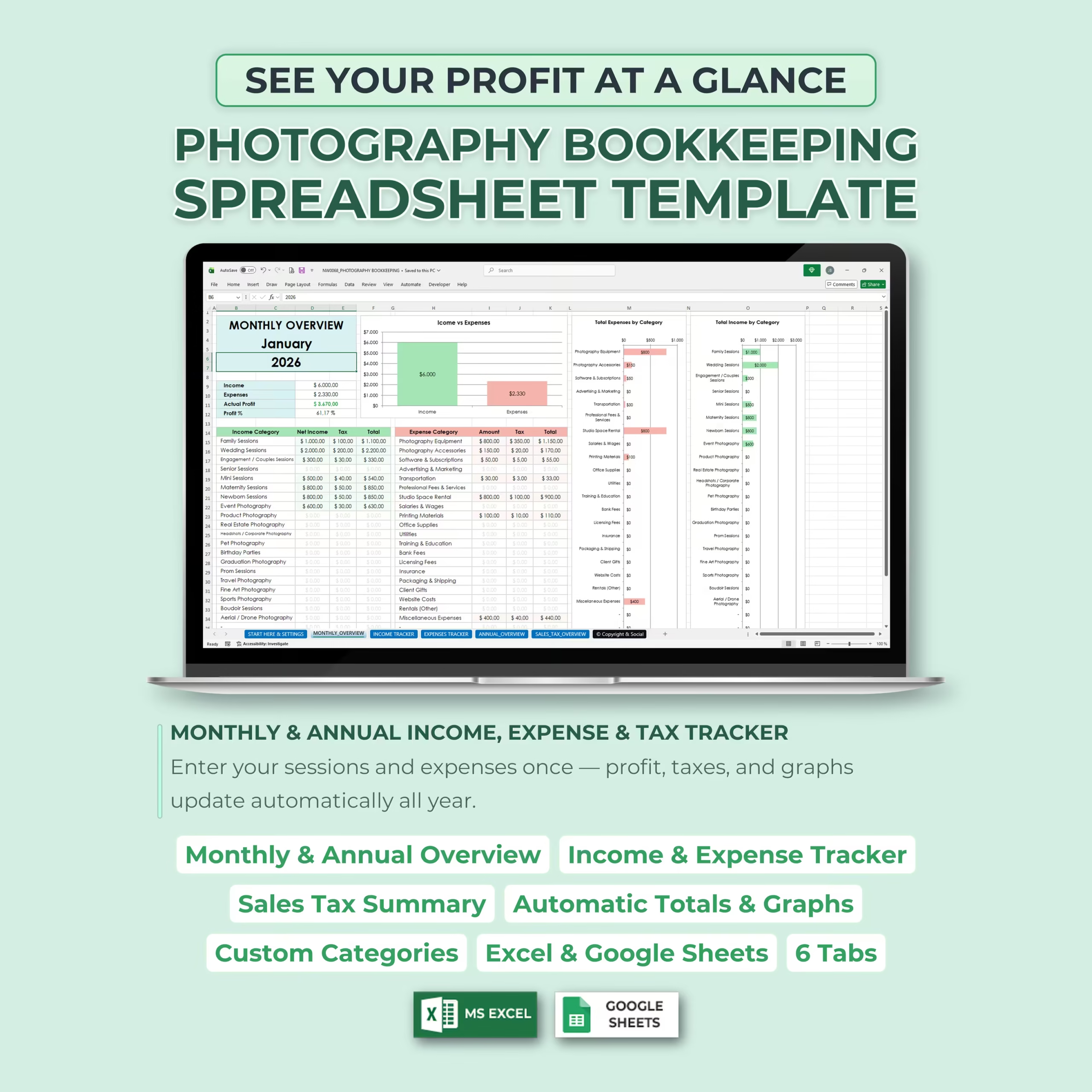
This Photography Bookkeeping Spreadsheet Template gives photographers one organized place to track income, expenses, taxes, monthly performance, annual totals, and business profit in Excel or Google Sheets.
If you are comparing a photography bookkeeping spreadsheet, photography expense tracker, photography income and expense spreadsheet, or photographer bookkeeping template, this file is built for buyers who want a ready-to-use template instead of creating a bookkeeping workbook from scratch.
See Your Photography Profit at a Glance
The template is designed to help you quickly understand how your photography business is performing.
Enter your sessions and expenses once, and the spreadsheet automatically updates monthly totals, annual summaries, net profit, profit percentage, tax totals, and visual graphs.
6 Tabs Included
This photography bookkeeping template includes 6 tabs to help you organize your business finances from setup to annual review.
The spreadsheet includes Start Here & Settings, Monthly Overview, Income Tracker, Expenses Tracker, Annual Overview, and Sales Tax Overview tabs.
Start Here & Settings Tab
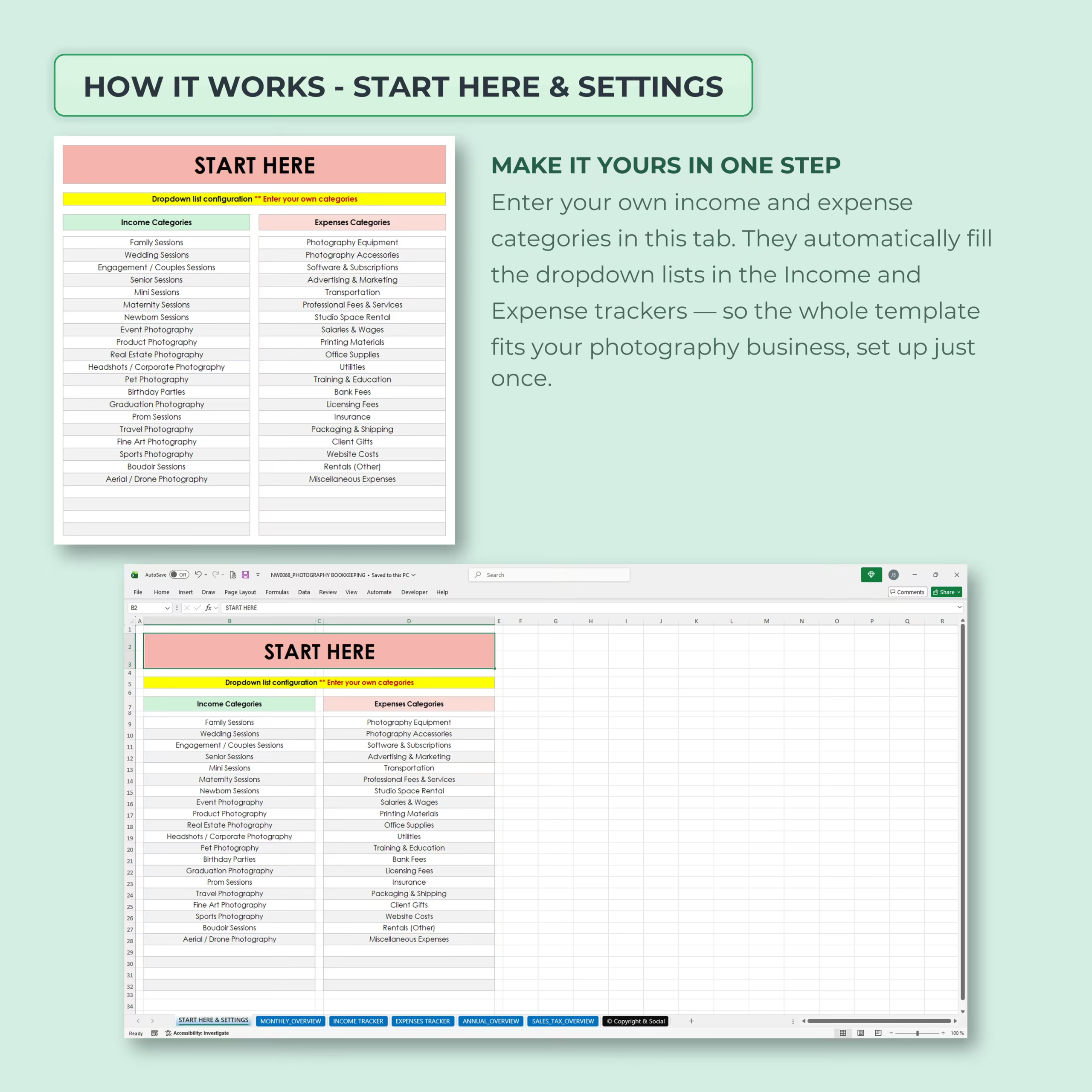
The Start Here & Settings tab lets you customize your own income and expense categories in one place.
These categories automatically fill the dropdown lists in the income and expense trackers, so you can set up the template once and adapt it to your photography business.
Custom Photography Income Categories
The template includes photography income categories such as family sessions, wedding sessions, engagement and couples sessions, senior sessions, mini sessions, maternity sessions, newborn sessions, event photography, product photography, real estate photography, headshots, pet photography, birthday parties, graduation photography, prom sessions, travel photography, fine art photography, sports photography, boudoir sessions, and aerial or drone photography.
You can edit these categories to match the services you offer.
Custom Photography Expense Categories
The expense categories are designed for photography businesses and can be customized to fit your workflow.
Examples include photography equipment, photography accessories, software and subscriptions, advertising and marketing, transportation, professional fees and services, studio space rental, salaries and wages, printing materials, office supplies, utilities, training and education, bank fees, licensing fees, insurance, packaging and shipping, client gifts, website costs, rentals, and miscellaneous expenses.
Monthly Overview Tab
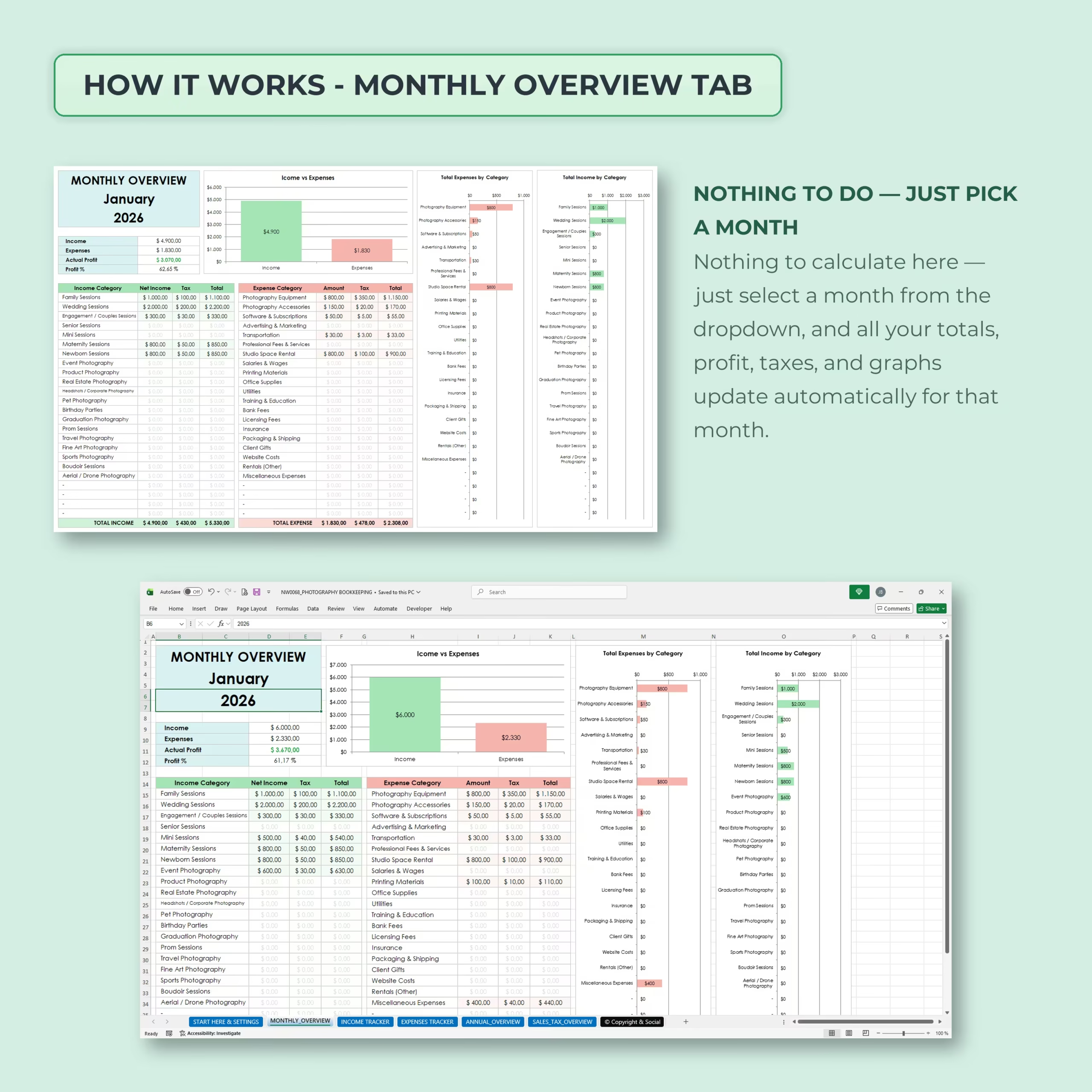
The Monthly Overview tab gives you a clear snapshot of your business performance for any selected month.
Just pick a month from the dropdown, and your income, expenses, actual profit, profit percentage, tax totals, and charts update automatically for that month.
Income Tracker Tab
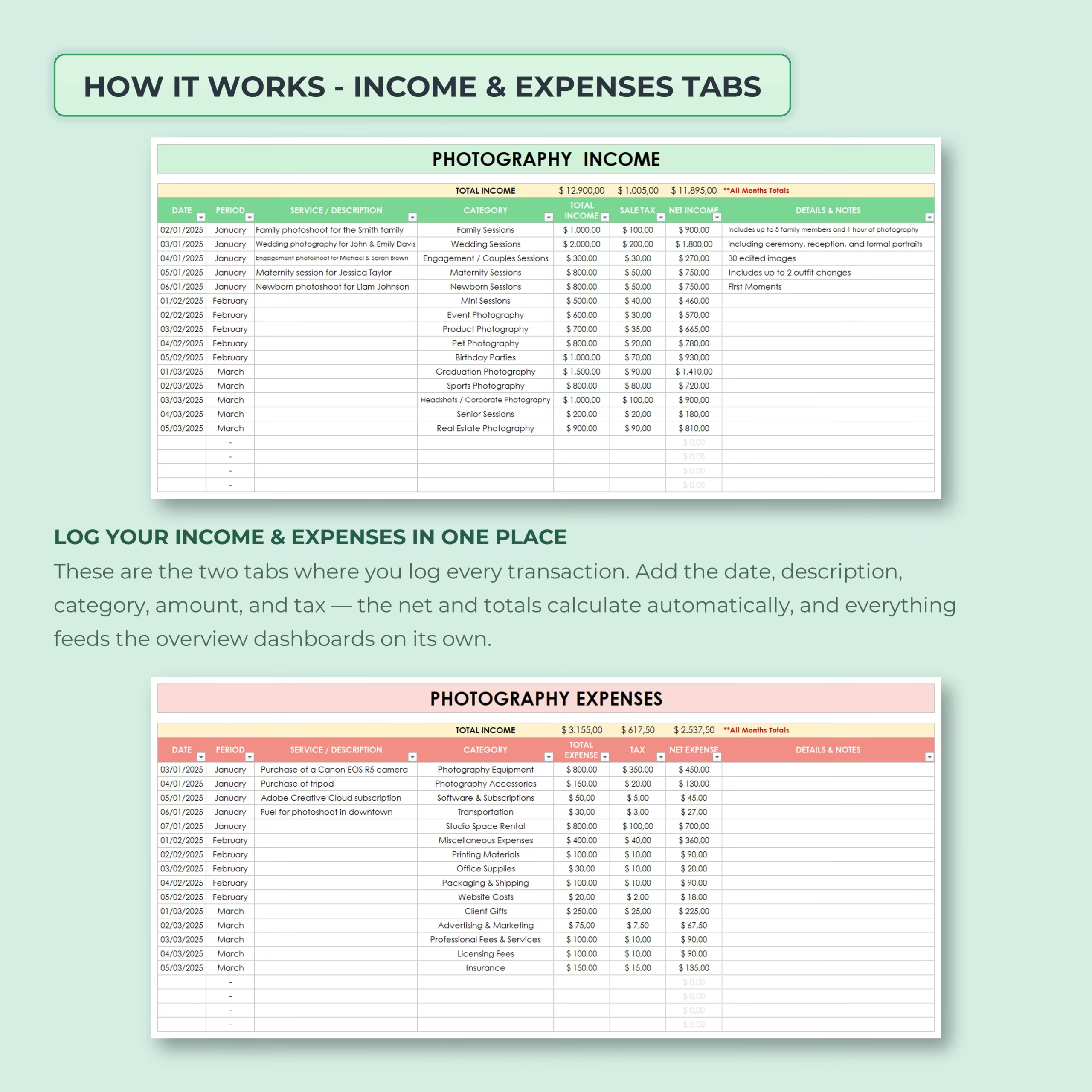
The Income Tracker tab is where you log every photography income transaction.
You can record the date, period, service or description, category, total income, sales tax, net income, and details or notes for each session, package, print order, licensing fee, or other sale.
Expenses Tracker Tab
The Expenses Tracker tab helps you record every business expense in one organized place.
You can track the date, period, service or description, category, total expense, tax expense, net expense, and notes, making it easier to understand where your money is going.
Annual Overview Tab
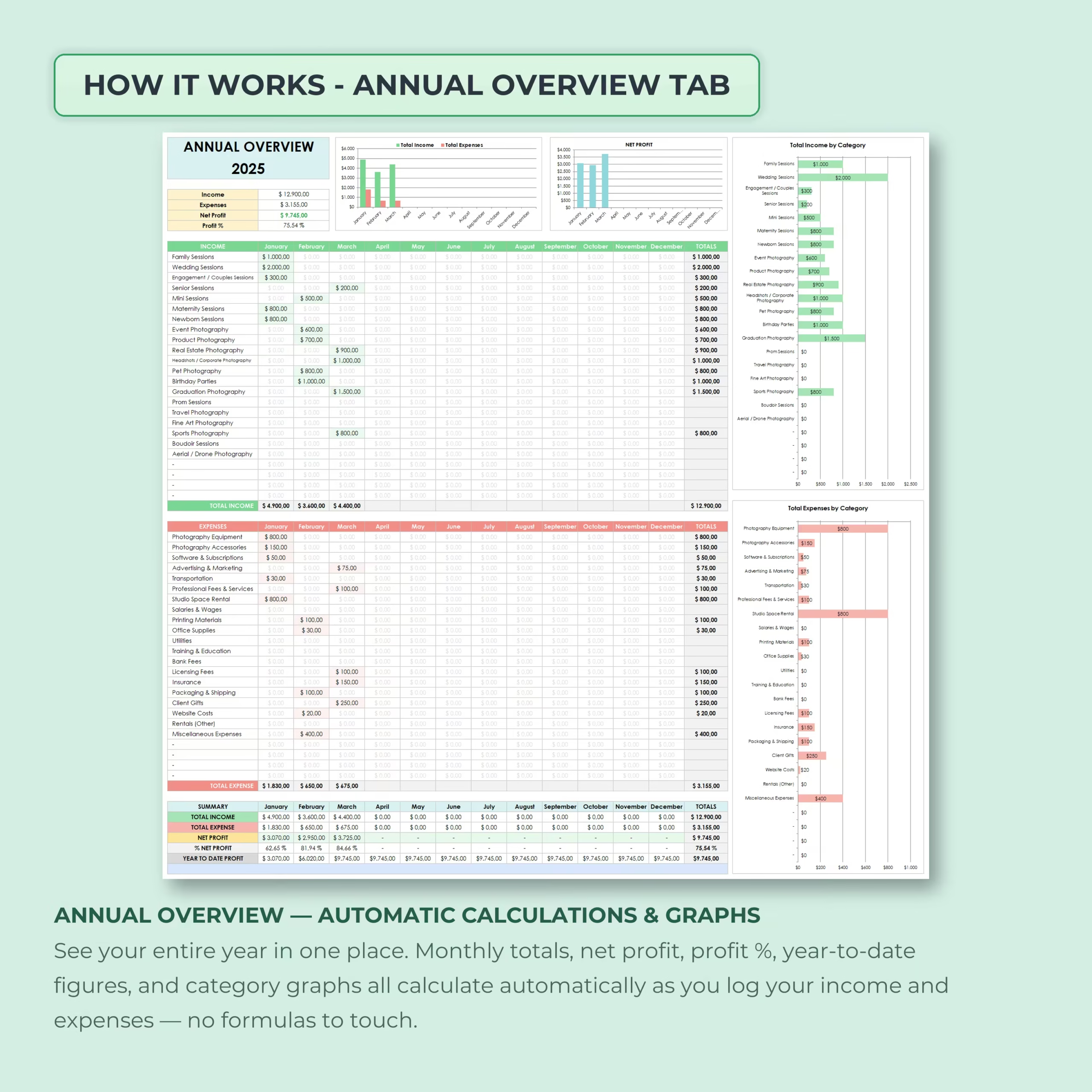
The Annual Overview tab gives you a complete year-long view of your photography business finances.
It automatically summarizes monthly income, expenses, net profit, profit percentage, year-to-date figures, and income and expense totals by category.
Sales Tax Overview Tab
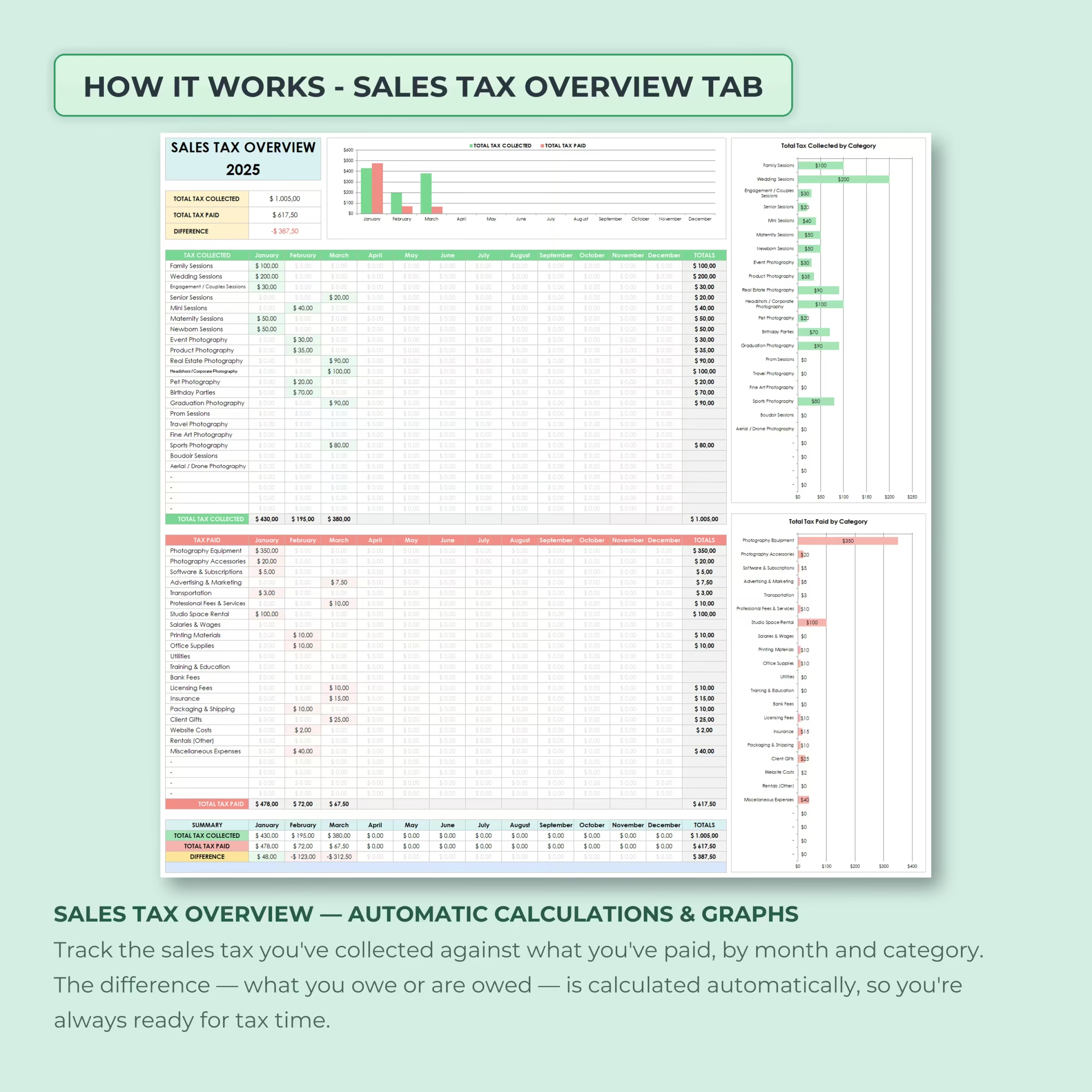
The Sales Tax Overview tab helps you track sales tax collected against sales tax paid by month and category.
The difference is calculated automatically, helping you understand what you may owe or what has already been paid based on the data you enter.
Automatic Calculations and Visual Charts
The spreadsheet includes automatic totals, summaries, percentages, and charts so you do not need to build formulas manually.
Charts help you compare income vs expenses, review total income by category, analyze expenses by category, monitor annual profit, and review sales tax activity at a glance.
Built for Photography Businesses
This template is designed specifically for photographers, photography studios, and creative business owners who want a simple bookkeeping system without complicated accounting software.
Use it to track client sessions, photo services, equipment purchases, software costs, marketing expenses, rental costs, printing expenses, taxes, and business profit throughout the year.
For U.S. buyers, it is especially useful when you need a practical spreadsheet to keep cleaner records for tax season, understand job profitability, and review business expenses without paying for a more complex bookkeeping platform.
Compatible With Excel and Google Sheets
This Photography Bookkeeping Spreadsheet Template works with both Microsoft Excel and Google Sheets, so you can use it in the platform that best fits your workflow.
You can update it throughout the year, duplicate it for future years, and customize it to match your photography business.
Who Is This Template For?
- Photographers
- Wedding photographers
- Family photographers
- Portrait photographers
- Event photographers
- Product photographers
- Real estate photographers
- Photography studio owners
- Freelance photographers
- Creative business owners who want simple bookkeeping
What’s Included
- Photography bookkeeping spreadsheet template
- Start Here & Settings tab
- Monthly Overview tab
- Income Tracker tab
- Expenses Tracker tab
- Annual Overview tab
- Sales Tax Overview tab
- Custom income categories
- Custom expense categories
- Monthly profit summary
- Annual income and expense summary
- Net profit and profit percentage calculations
- Sales tax collected and tax paid tracking
- Category-based charts
- Automatic totals and graphs
- Excel and Google Sheets versions
Stay Organized and Understand Your Photography Finances
This Photography Bookkeeping Spreadsheet helps you log income, track expenses, monitor sales tax, review profit, and understand your business performance month by month.
Use it to keep your photography finances organized, make better business decisions, and stay more prepared for tax season.
Choose This Photography Bookkeeping Template If You Need More Than a Basic Expense Log
This template is a strong fit if you need a complete photography bookkeeping workbook rather than a simple list of income and expenses. Its 6-tab structure combines transaction tracking, monthly performance, annual totals, profit reporting, and sales tax activity in one downloadable file.
- You want separate income and expense trackers with photography-specific categories
- You need monthly and annual profit summaries for a U.S. photography business
- You collect sales tax and want to compare tax collected with tax paid
- You prefer an editable Microsoft Excel or Google Sheets template over subscription software
Reviews
There are no reviews yet.