
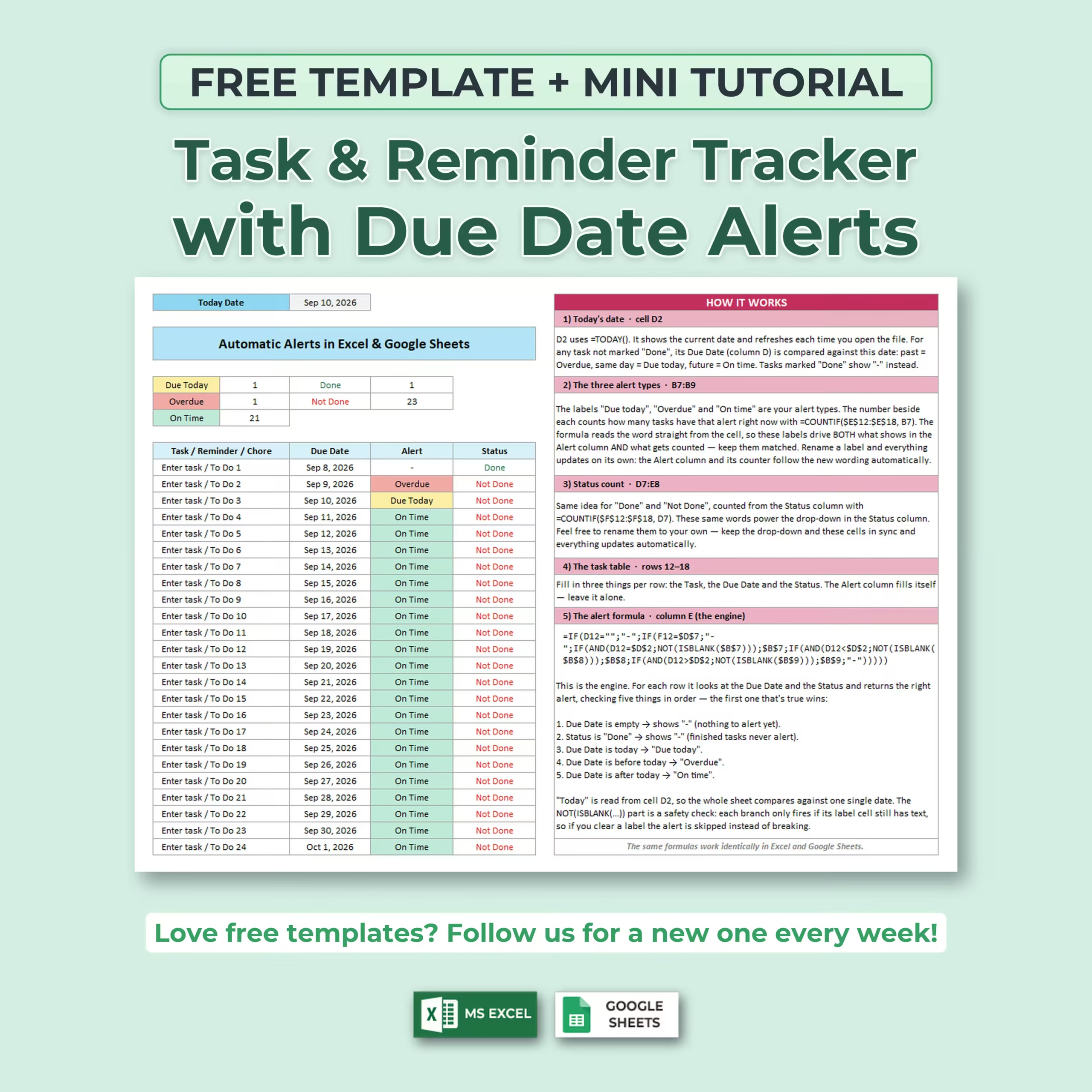
FREE Task & Reminder Tracker with Automatic Due Date Alerts
Need a simple way to see what is due today, what you’ve missed, and what still has time left?
This FREE Task & Reminder Tracker for Excel and Google Sheets automatically checks your due dates against today’s date and tells you which tasks are Due Today, Overdue, or On Time.
There is no purchase required. Download the spreadsheet, add your tasks, and start using it right away.
Know What Needs Attention Automatically
You don’t need to manually work out which deadlines are approaching or which tasks are late.
For every unfinished task, the spreadsheet checks the due date and automatically assigns one of three alerts:
- Due Today — the task is due today
- Overdue — the due date has already passed
- On Time — the deadline is still in the future
The alerts are color-coded, making it easy to scan your list and immediately see what requires attention.
Today’s Date Updates Automatically
The tracker uses today’s date as the reference for every alert.
When you open the spreadsheet on a new day, the date refreshes and your alerts recalculate automatically. A task that was previously On Time can become Due Today and later Overdue without you changing anything manually.
Simple Task & Reminder List
Each row gives you the essential fields you need:
- Task / Reminder / Chore
- Due Date
- Automatic Alert
- Status
Add appointments, work deadlines, household chores, bills, school assignments, follow-ups, personal reminders, project tasks, or anything else you need to remember.
Mark Tasks as Done or Not Done
Use the built-in status dropdown to mark each item as Done or Not Done.
Completed tasks no longer generate deadline alerts, so your attention stays focused on the items that still need action.
Automatic Summary Counts
A small dashboard at the top of the tracker automatically counts your tasks by status.
You can instantly see:
- How many tasks are Due Today
- How many tasks are Overdue
- How many tasks are On Time
- How many tasks are Done
- How many tasks are Not Done
The counts update automatically whenever you change a due date or task status.
Color-Coded Deadline Alerts
The visual alert system makes the tracker quick to understand without having to read every date individually.
Overdue, Due Today, and On Time tasks each receive their own visual treatment, helping important deadlines stand out immediately.
Mini Tutorial Included
This free template is also designed as a small learning resource.
A built-in How It Works section explains the main formulas behind the tracker, including:
- How today’s date is generated
- How automatic deadline alerts work
- How task statuses are counted
- How the task table connects to the alerts
- How the alert formula decides between Due Today, Overdue, and On Time
This makes it useful not only as a ready-to-use task tracker, but also as a simple example for anyone learning how to build automatic reminders in spreadsheets.
Customize the Labels
The spreadsheet can easily be adapted to your own workflow.
Rename tasks, alert labels, or status wording to create a tracker for work, school, household chores, appointments, projects, follow-ups, deadlines, or personal organization.
Useful for Everyday Tasks and Deadlines
You can use this free spreadsheet for:
- Daily task management
- Work deadlines
- Project follow-ups
- School assignments
- Household chores
- Appointments
- Administrative reminders
- Bill reminders
- Personal to-do lists
- Recurring planning workflows
Works in Excel & Google Sheets
The same core formulas work in both Microsoft Excel and Google Sheets, so you can use the tracker on the spreadsheet platform you prefer.
Completely FREE
This is a free spreadsheet template. There is no paid version required to use the tracker shown here.
Download it, make your own copy, customize it if you want, and start tracking your tasks and deadlines immediately.
If you’re looking for a simple free task tracker spreadsheet, free reminder template, Excel due date tracker, or Google Sheets deadline tracker, this template gives you an easy ready-made starting point.
Reviews
There are no reviews yet.