
Easy Bookkeeping Template for Excel and Google Sheets, United States
Organize your business finances with this Easy Bookkeeping Template for Excel and Google Sheets. It is a ready-to-use small business bookkeeping spreadsheet built for U.S. owners who want a practical way to track income, expenses, taxes, profit, accounts, and transfers without building their own system from scratch.
If you are searching for a bookkeeping template, bookkeeping template for small business, small business expense tracker Excel, income and expense tracker, profit and loss spreadsheet, bookkeeping spreadsheet Excel, or Google Sheets bookkeeping template, this file gives you a cleaner starting point than a blank spreadsheet and keeps your records organized month by month.
Built for U.S. Small Business Bookkeeping
This version is designed for the United States and works well for freelancers, consultants, contractors, service businesses, online sellers, self-employed professionals, sole proprietors, and small LLC owners who need a simple bookkeeping workflow in spreadsheet form.
It helps you keep business activity together in one workbook so you can review revenue, expenses, tax amounts, profit goals, account balances, and year-to-date performance more easily throughout the year.
Why Buy a Bookkeeping Template Instead of Starting From Scratch
Many business owners look for a bookkeeping spreadsheet because they want something simpler than full accounting software but more organized than scattered notes and separate files. This template gives you a ready-made layout with formulas, summaries, dashboards, and category tracking already in place.
Instead of building a spreadsheet from zero, you can customize the file for your business and start tracking income and expenses right away in Excel or Google Sheets.
This makes it a strong fit for buyers comparing spreadsheet-based bookkeeping tools before moving to more expensive software, especially if they want a downloadable bookkeeping template for small business they can edit themselves.
Set Up Once and Keep Updating Through the Year
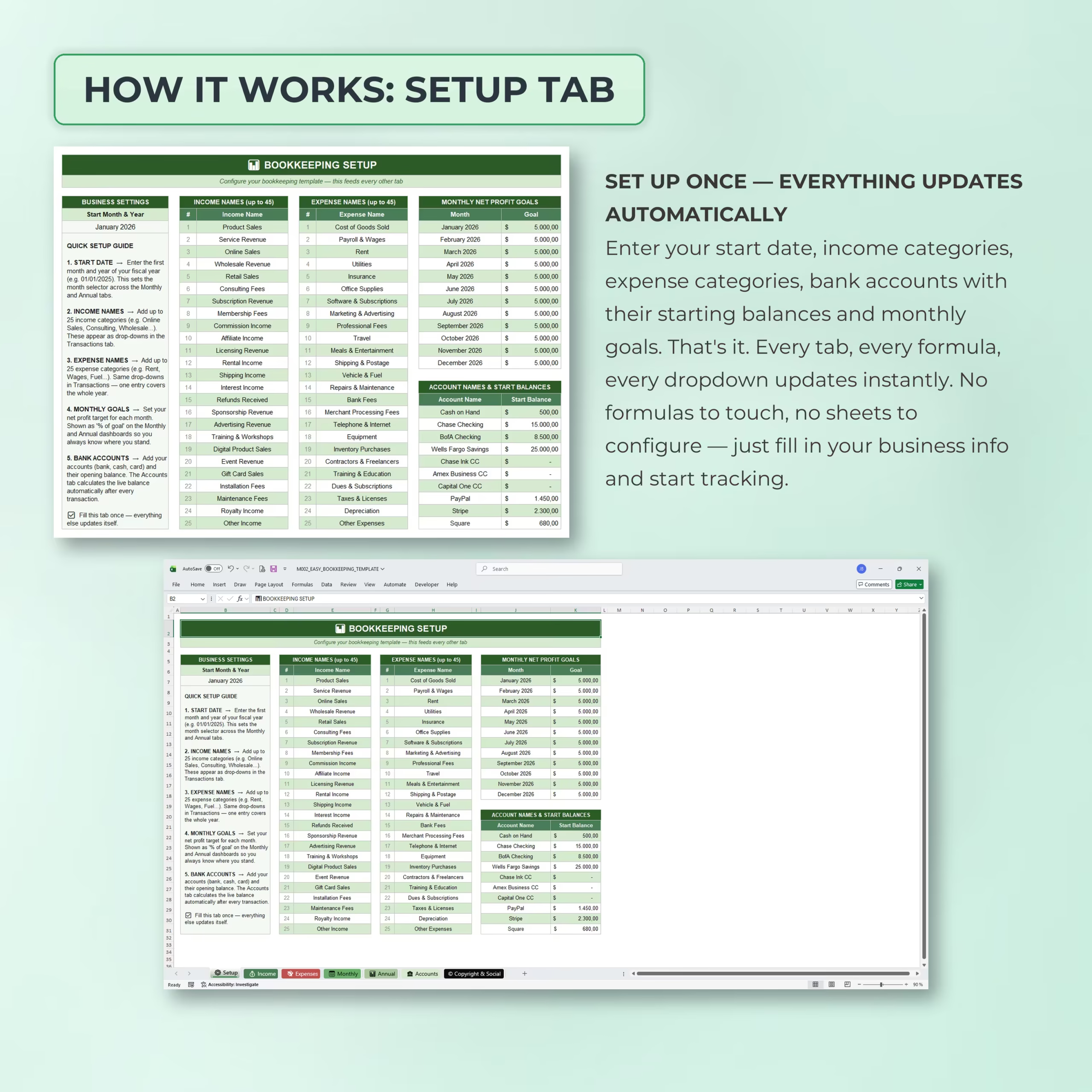
The setup tab lets you tailor the template to your business. Enter your start date, income categories, expense categories, account names, starting balances, and monthly net profit goals. Once the setup is done, the rest of the workbook updates automatically.
You can customize:
- Business start date
- Income categories
- Expense categories
- Monthly net profit goals
- Bank accounts and starting balances
- Payment accounts such as PayPal, Stripe, Square, and credit cards
Track Small Business Income and Sales
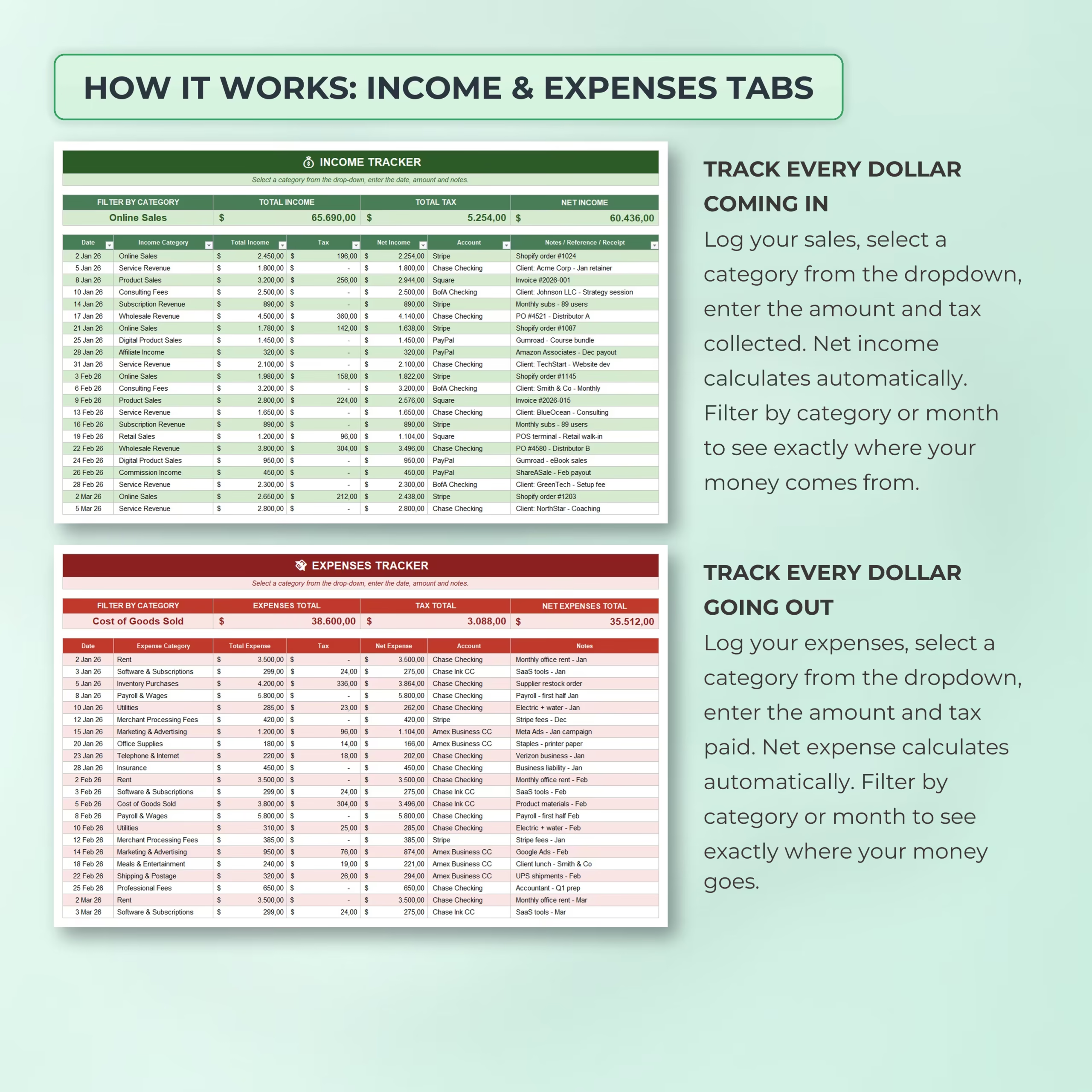
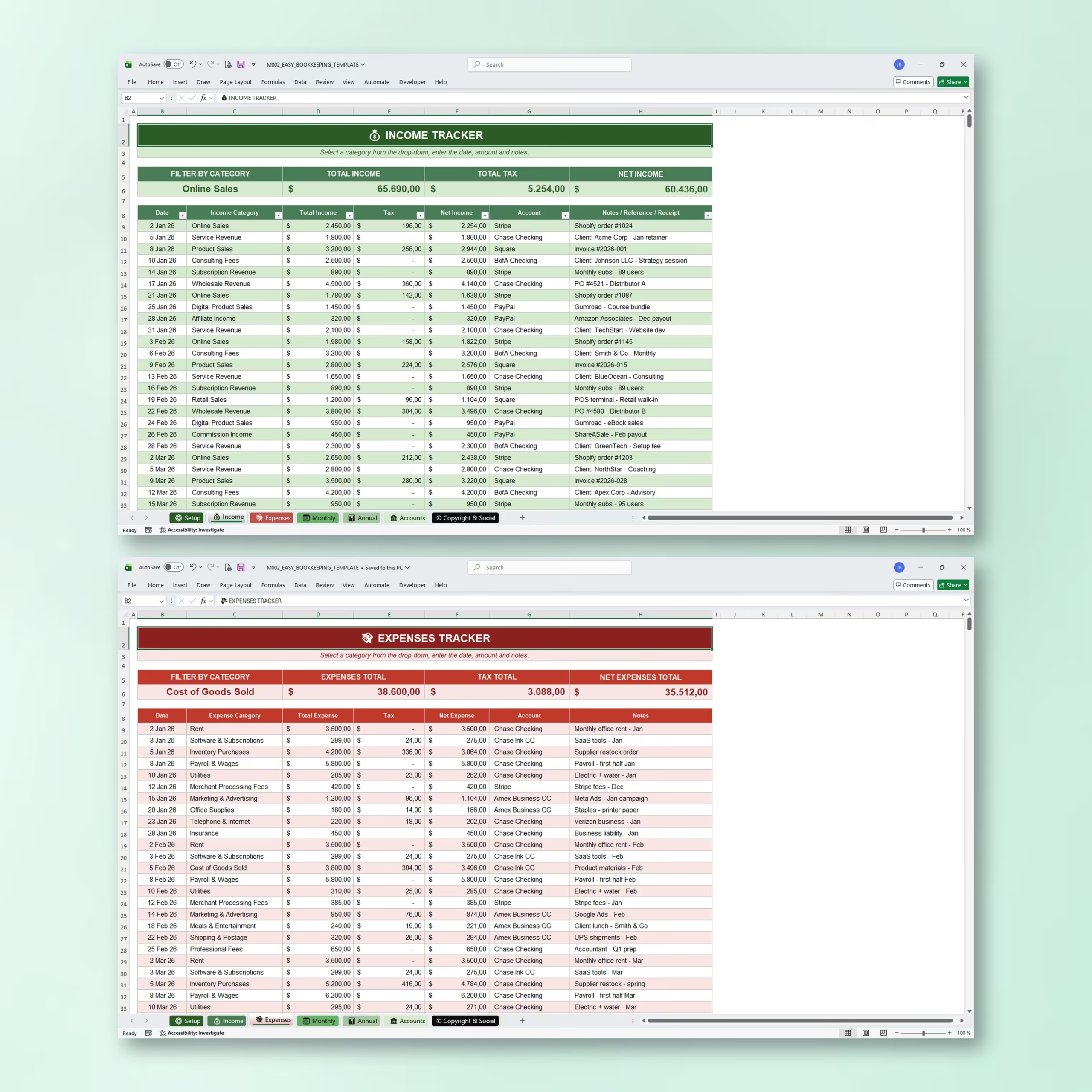
The income tracker helps you log sales and business revenue in one table. Add the date, category, total income, tax collected, net income, account, and notes or references.
As you enter income, the spreadsheet updates totals and business summaries automatically. This makes the template useful as both a small business income tracker and a practical bookkeeping template for Excel or Google Sheets.
Track Expenses, Taxes, and Net Profit
The expense tracker helps you record business costs and understand where your money is going. Log each expense with the date, expense category, total expense, tax paid, net expense, account, and notes.
Because both income and expenses are organized in the same workbook, you can review profitability more clearly and keep a better internal record for budgeting, bookkeeping, and year-end review.
This also makes the file relevant for buyers looking for a small business expense tracker Excel, a simple business expense spreadsheet, a self-employed expense tracker, a bookkeeping spreadsheet for LLC, or a reusable profit and loss spreadsheet they can update month after month in Excel or Google Sheets.
Useful for Schedule C and Year-End Organization
For many U.S. freelancers and sole proprietors, this workbook also works as a practical Schedule C expense tracker to keep income and deductible business expenses organized before tax time. It is not tax advice, but it can make records easier to review, sort, and hand off to a tax preparer or accountant.
Monthly Dashboard and Annual Profit and Loss Overview
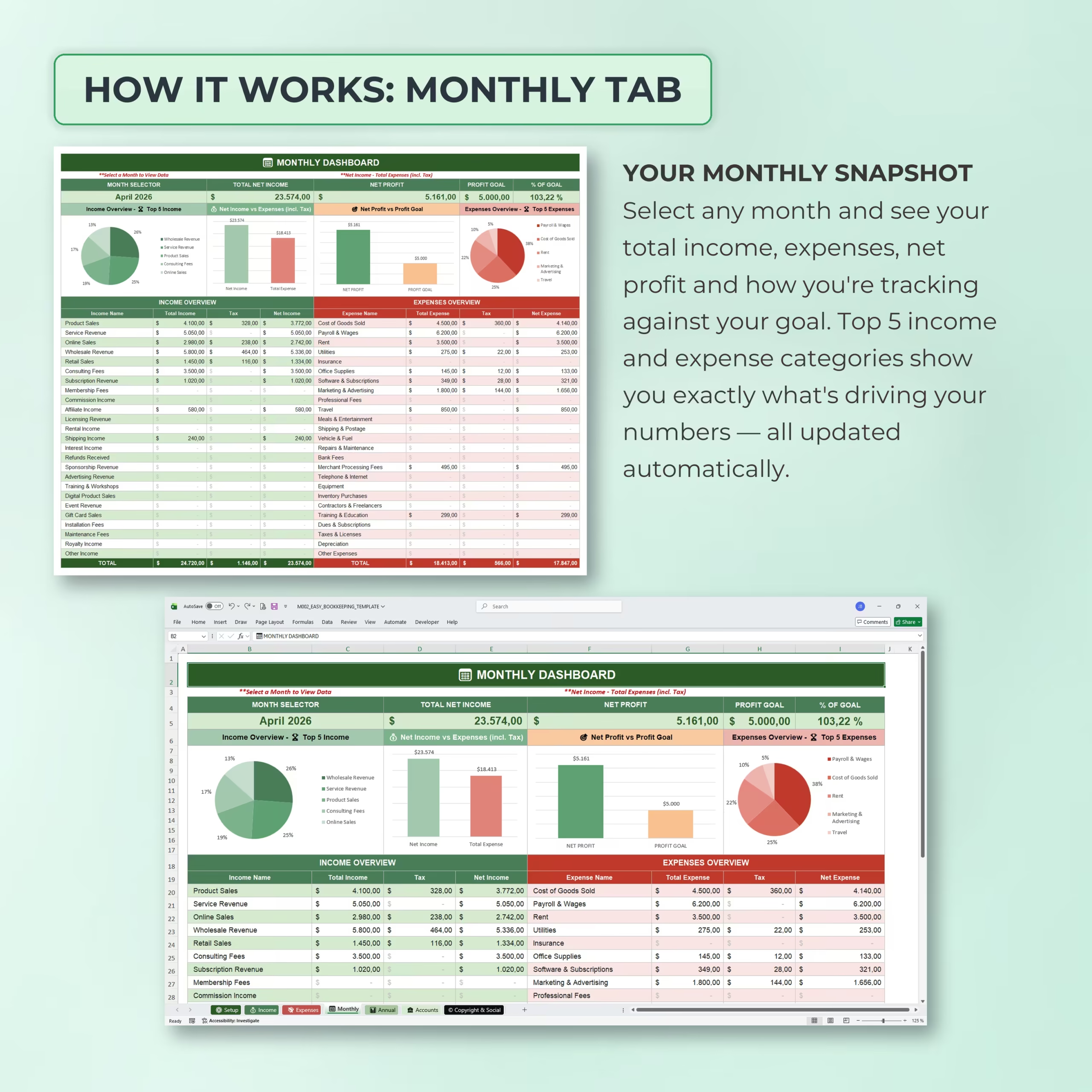
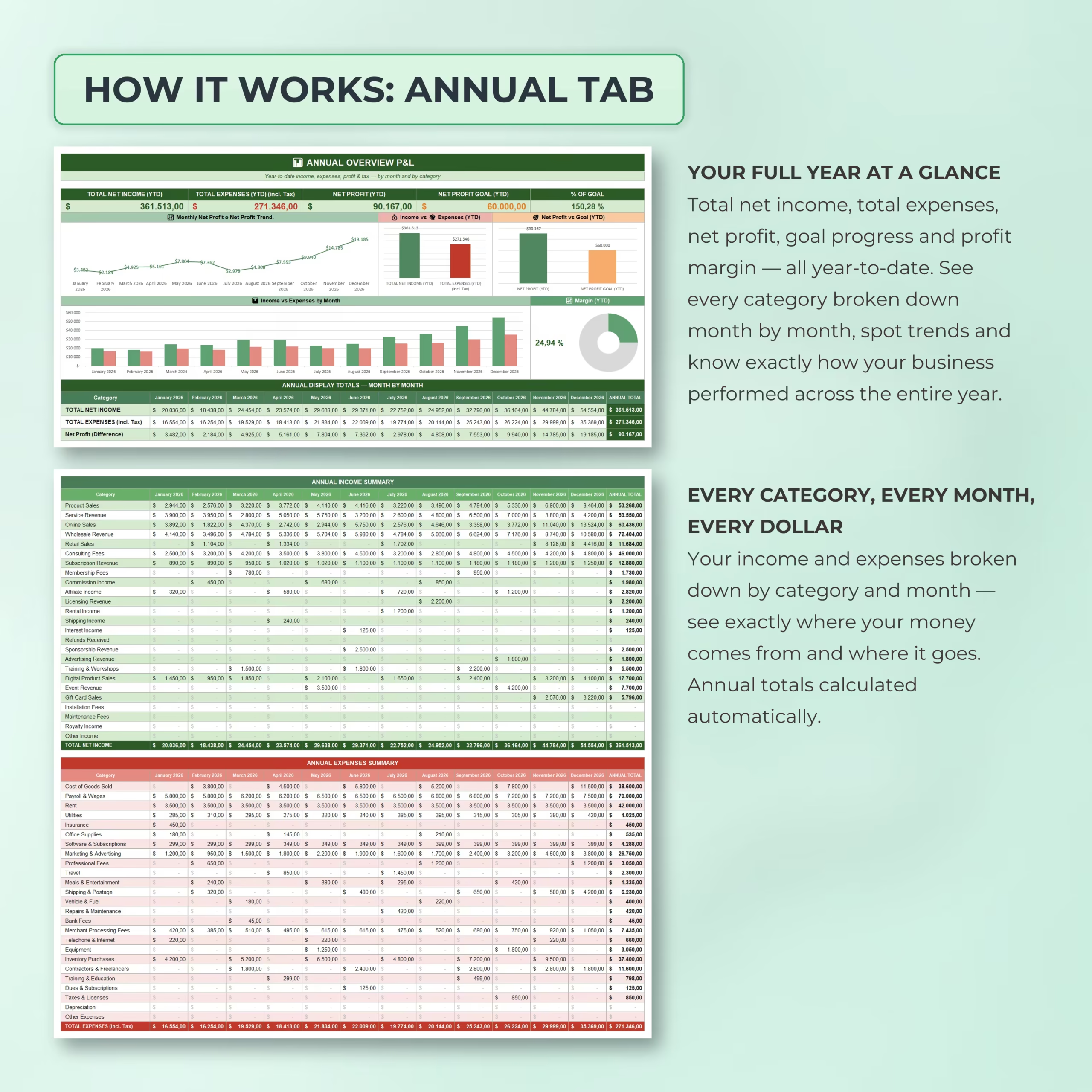
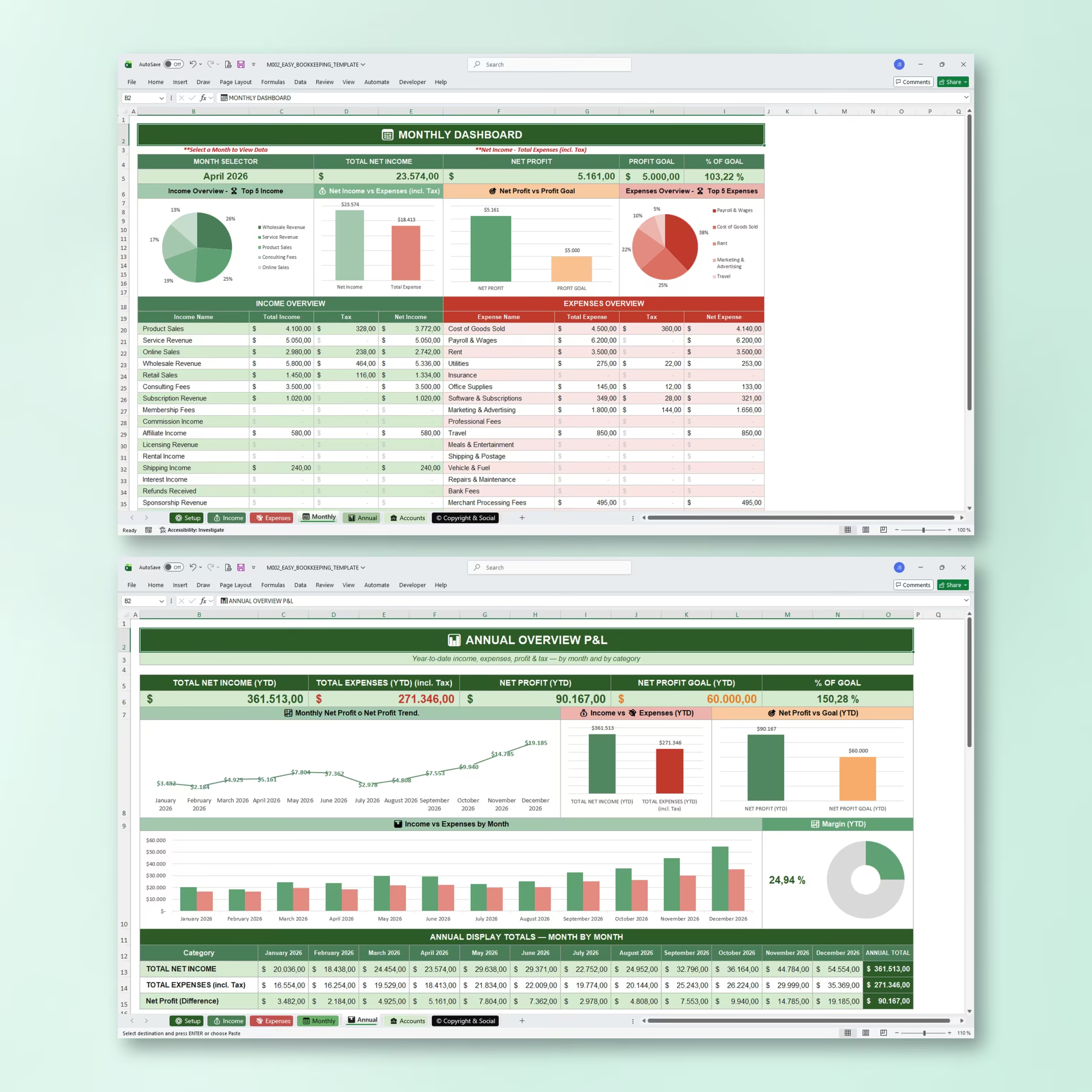
The monthly dashboard gives you a clear snapshot of performance for any selected month. You can review total net income, total expenses, net profit, profit goal progress, and category highlights in one place.
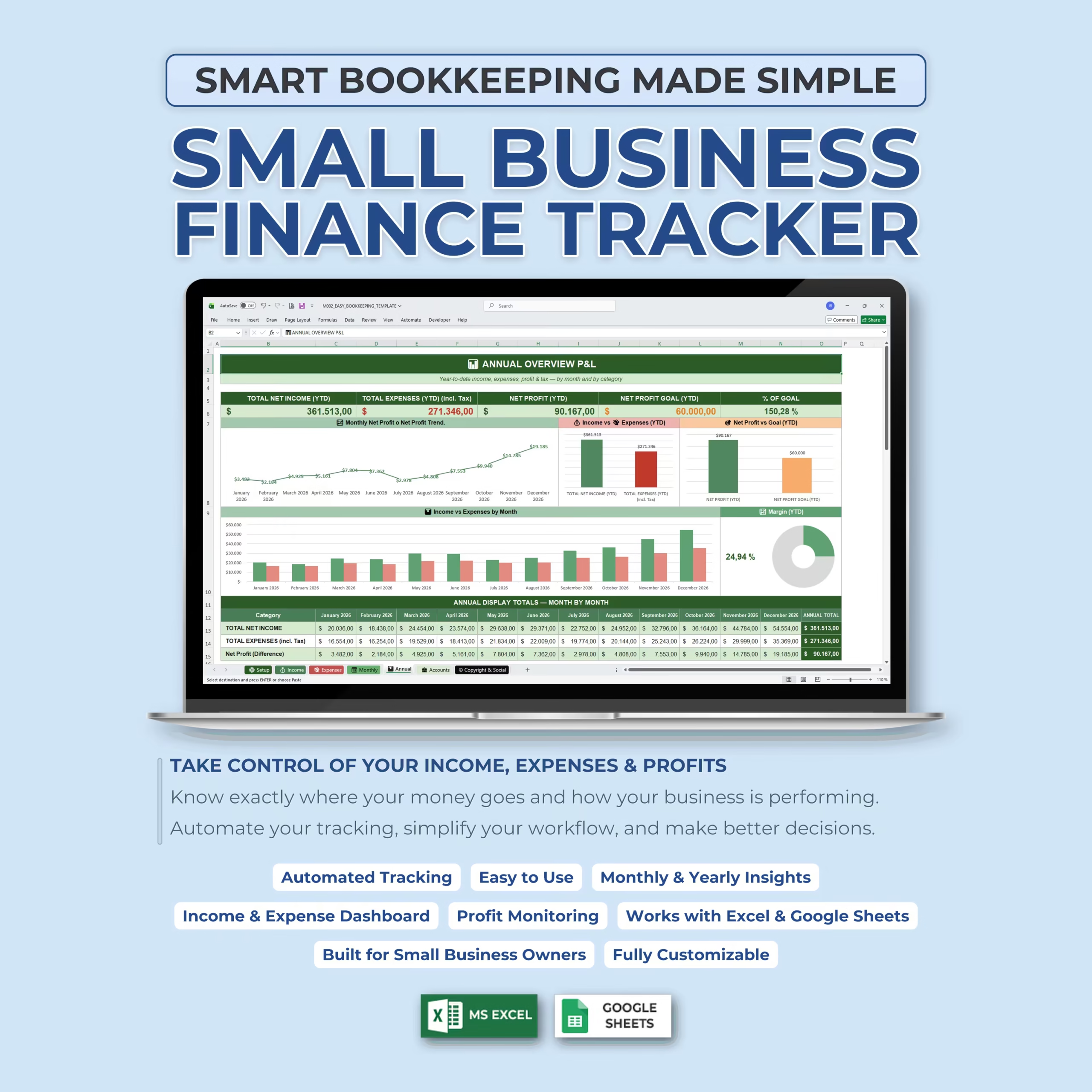
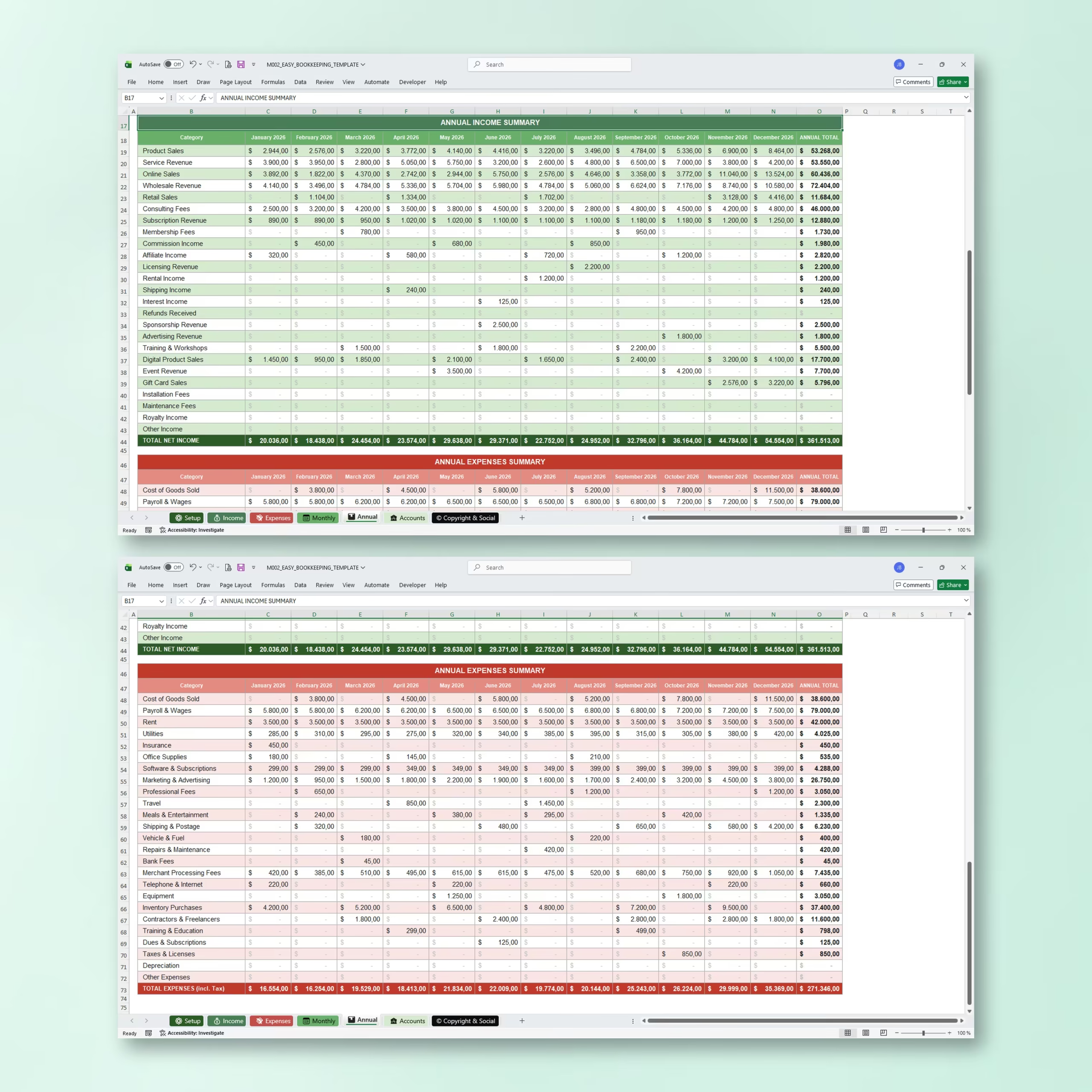
The annual overview gives you a year-to-date profit and loss summary, monthly trends, category breakdowns, and a broader picture of business performance across the year.
For U.S. buyers searching for a practical profit and loss spreadsheet or business expense spreadsheet, this gives a clearer year-round view than a basic one-tab tracker.
Track Accounts and Transfers in One Workbook
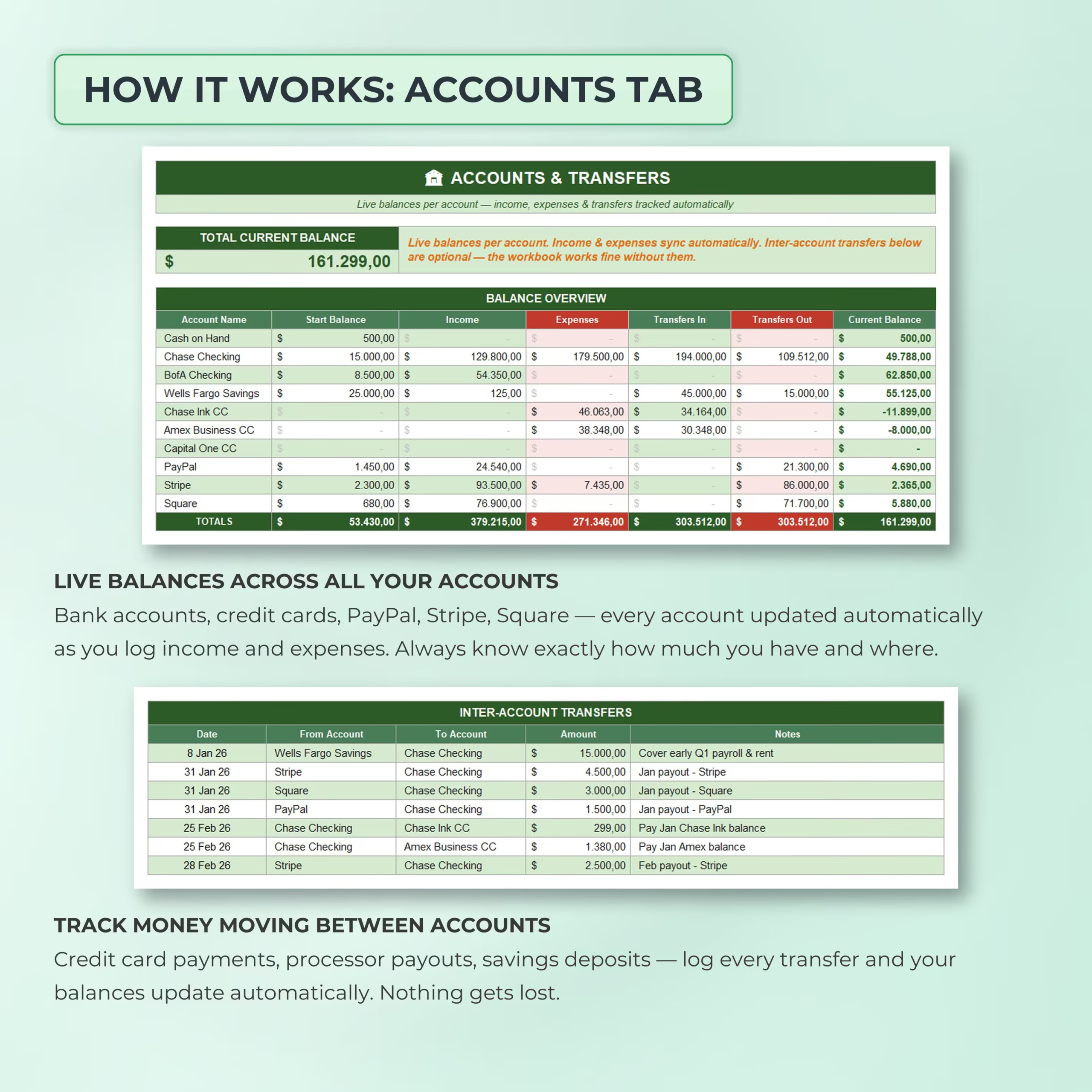
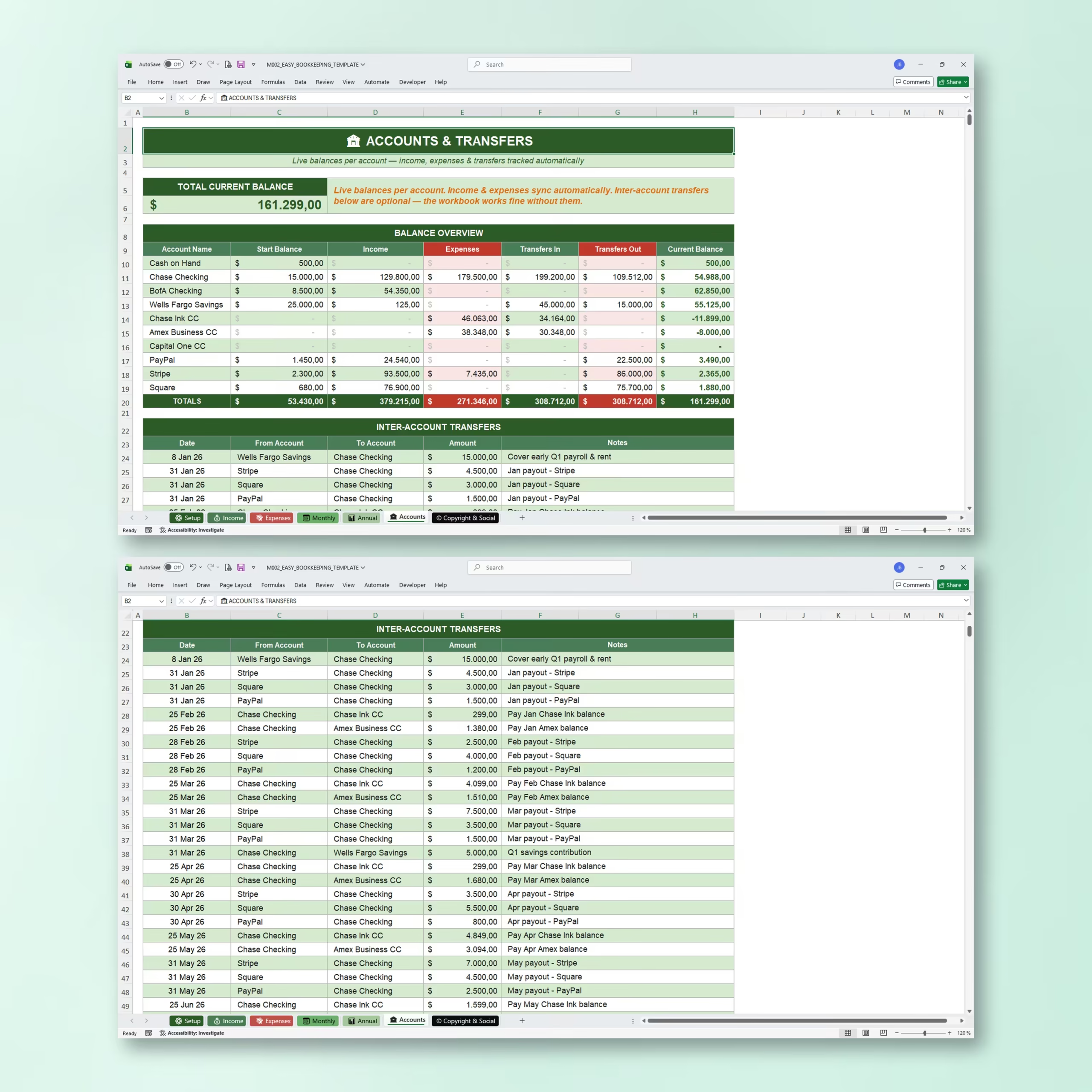
The accounts section helps you monitor balances across bank accounts, credit cards, cash, PayPal, Stripe, Square, and other payment accounts. You can also log transfers between accounts, such as processor payouts, credit card payments, savings transfers, and money moved internally.
This is useful if you want more than a simple income and expense sheet and need a bookkeeping spreadsheet that reflects how money actually moves through the business.
Works with Excel and Google Sheets
This template works with both Microsoft Excel and Google Sheets, so you can use the platform that fits your workflow. Use it offline in Excel or online in Google Sheets.
Who This Bookkeeping Spreadsheet Is For
- Small business owners who need a simple bookkeeping template
- Freelancers and contractors tracking income and expenses
- Service-based businesses managing monthly profit goals
- Online sellers organizing revenue and business costs
- Sole proprietors and LLC owners who want cleaner records before tax season
- Anyone looking for a practical bookkeeping spreadsheet for Excel or Google Sheets
What You Can Track
- Income and sales
- Expense categories
- Tax collected
- Tax paid
- Net income
- Net expenses
- Net profit
- Monthly profit goals
- Profit margin
- Year-to-date performance
- Bank account balances
- Credit card balances
- PayPal, Stripe, Square, and payment processor activity
- Transfers between accounts
Get Your Small Business Bookkeeping Template
If you want an easy bookkeeping template, small business bookkeeping spreadsheet, income and expense tracker, bookkeeping spreadsheet for LLC, or a practical profit and loss template, this workbook gives you a ready-to-use option for Excel and Google Sheets without starting from scratch.
This file gives you a simple way to keep business records cleaner, track profit more consistently, and maintain a more usable system for monthly reviews and year-end organization.
Download it today and start with a ready-made bookkeeping spreadsheet built for real small business use in the United States.
Note: This template is a bookkeeping organization tool. It does not replace professional tax, legal, or accounting advice.
Reviews
There are no reviews yet.